Does Stripe file sales tax returns?

Written by

Head of Product Marketing

Principal Product Manager
Fact-checked by
Alex Lamachenka
Published
With the massive success of Stripe as a payment platform, Stripe Tax has become one of the most accessible ways for companies to automate sales tax.
As a calculation engine, Stripe Tax can handle global tax calculations and works across multiple transaction types, including in-person sales, recurring subscriptions, and some marketplace sales.
However, while powerful, there are a few things that Stripe Tax doesn’t handle or outsources to partners. Sales tax is a great example. While Stripe Tax doesn’t file sales tax directly, the platform works with various partner to handle tax filings across the U.S. or globally.
These and other limitations are important to understand for users interested in the Stripe platform. In this article, we’ll cover what Stripe Tax can and can’t do and what options are available to Stripe users who need additional filing compliance and support.
What Stripe Tax can do
Stripe Tax is primarily designed to help companies collect sales tax at checkout when payments are processed through Stripe.
For Stripe users, enabling accurate tax calculations is as easy as purchasing a Stripe Tax plan and activating the module from the Stripe dashboard. That’s far easier than finding a dedicated provider or configuring a tax engine to work with a specific online marketplace or payment processor. Working with Stripe is fast and easy, lowering the operational burden and the amount of manual work required to charge the correct amount of tax.
Stripe Tax can also handle other aspects of tax compliance, but it doesn’t manage every part of the process.
Here’s a closer look at what Stripe Tax handles today:
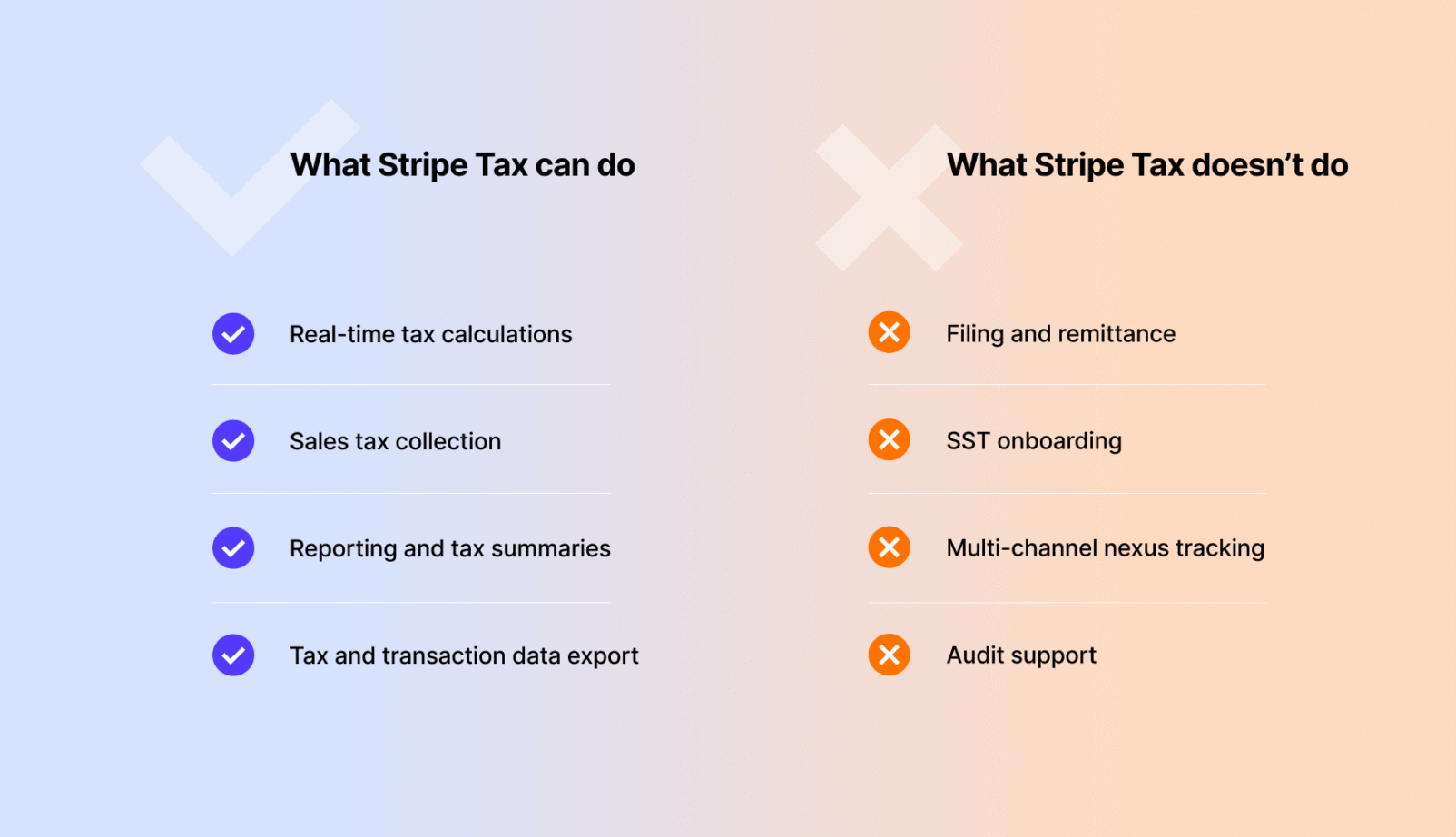
- Real-time tax calculations at checkout. Stripe Tax automatically calculates tax rates during checkout based on customer location, transaction details, and configured tax rules. Customers using the engine can receive highly accurate tax rates without the need to manually configure tax settings across multiple jurisdictions.
- Tax collection based on configured product tax codes. Stripe relies on product tax codes and tax behavior settings to determine whether and how a product should be taxed. This is critical when for product bundles and SaaS companies, because taxability varies depending on how a state classifies a product.
- Reporting and tax summaries in Stripe. Users can review transactions and tax collected from a centralized dashboard, giving companies a bird’s eye view of their Stripe-related sales and associated compliance responsibilities.
- Data exports for filing workflows. Teams using Stripe Tax can export their tax and transaction data for use outside the platform, such as for internal reporting or external filing workflows (important for filing methods that don’t rely on Stripe’s integrated filing partners).
- Offer third-party filing solutions. While Stripe Tax doesn’t file directly, the platform provides access to third-party partners who can file on your behalf. Some of these costs are covered in the Tax Complete plan, but additional fees may be required and filing credits are limited.
For businesses operating exclusively within Stripe, a subscription to Stripe’s Tax Complete plan can provide support for most aspects of tax compliance. That allows teams to cover most day-to-day tax and compliance operations within the platform.
What Stripe Tax doesn’t do
Even though Stripe Tax simplifies tax operations, the platform isn’t designed to take ownership of the entire compliance lifecycle. Calculation, while essential, is only one stage of the process.
Fortunately, users have options.
Stripe’s Tax Complete package offers a partnership with third-party filing providers, as well as credits to cover some or all of the filing cost (varies by vendor and region). Users can also transfer their data via integration or export it via CSV [1] in order to file manually. However, in each of these scenarios, teams must move outside of the Stripe ecosystem and work externally to file and remit taxes.
Because Stripe Tax isn’t designed for end-to-end tax compliance, we want to quickly point out a few things that the platform doesn’t handle:
- Sales tax registration (partial). Stripe Tax can facilitate state registrations for U.S. remote sellers, but registrations outside of the U.S. are handled by Taxually and are subject to additional fees.
- Streamlined Sales Tax (SST). Neither Stripe Tax nor any of its affiliates participate in the SST program, however Stripe users can work with TaxCloud via the TaxCloudStripe integration to take advantage of those savings.
- Multi-channel nexus tracking. Stripe Tax only sees Stripe-based transactions. If transactions are processed by other payment processors, such as Chargebee, or through sales channels that aren’t using Stripe, Stripe Tax can’t calculate tax and those transactions won’t be listed on the Stripe dashboard.
- Audit support and notice management. Stripe doesn’t provide support in the event of a government audit, and the platform doesn’t manage tax-related correspondence on your behalf. (Note: This is common among tax partners.)
- Auxiliary services (VDAs, exemption management, etc.). Because Stripe Tax is primarily focused on calculations, the platform doesn’t offer many supporting services for users. However, via integrations, it’s possible to handle some of these needs using third-party services.
Note that none of these missing features means that Stripe Tax is incomplete or ineffective. It’s a powerful platform with some strict limitations around its scope and intended use case.
As obligations grow, many companies keep Stripe Tax for calculations and move to add additional support through third-party sales tax providers that handle the most complex and manual part of sales tax compliance like registrations and filing.
TaxCloud is one such provider, built for growing mid-sized businesses that want to eliminate the manual work related to sales tax compliance and focus on higher-value priorities.
In doing so, teams continue to leverage Stripe’s payment platform and tax engine alongside other automated filing tools to create a complete, end-to-end tax solution.
Why this matters
Knowing Stripe Tax’s limitations around filing and automation is important because compliance issues tend to appear as businesses begin to grow.
Due to nexus thresholds, remote companies aren’t typically required to register and remit sales tax within a specific state until certain conditions are met. Teams selling in one or two states, or who are collecting payments through a single platform, may even be able to handle filing-related duties in-house.
The problem is that a company’s tax footprint doesn’t grow at the same rate as the rest of the business. A single enterprise contract or a successful marketing campaign could put the company over a revenue or transaction threshold in a state.

From Shark Tank to nexus in 30 states overnight
Rareform had this experience after appearing on Shark Tank. Overnight, sales skyrocketed, surpassing nexus obligations in 30 states.
These distinctions matter because filing isn’t an automatic process with Stripe Tax. Businesses will need to determine where returns need to be filed, which registrations are required, and whether all taxable revenue is being captured.
After that initial assessment is complete, teams need to determine which filing partners can help them stay compliant while paying close attention to both industry and platform specific challenges.
SaaS companies can trigger nexus in a few deals
One of the biggest differences between SaaS and traditional ecommerce is how quickly sales can scale and tax exposure can materialize.
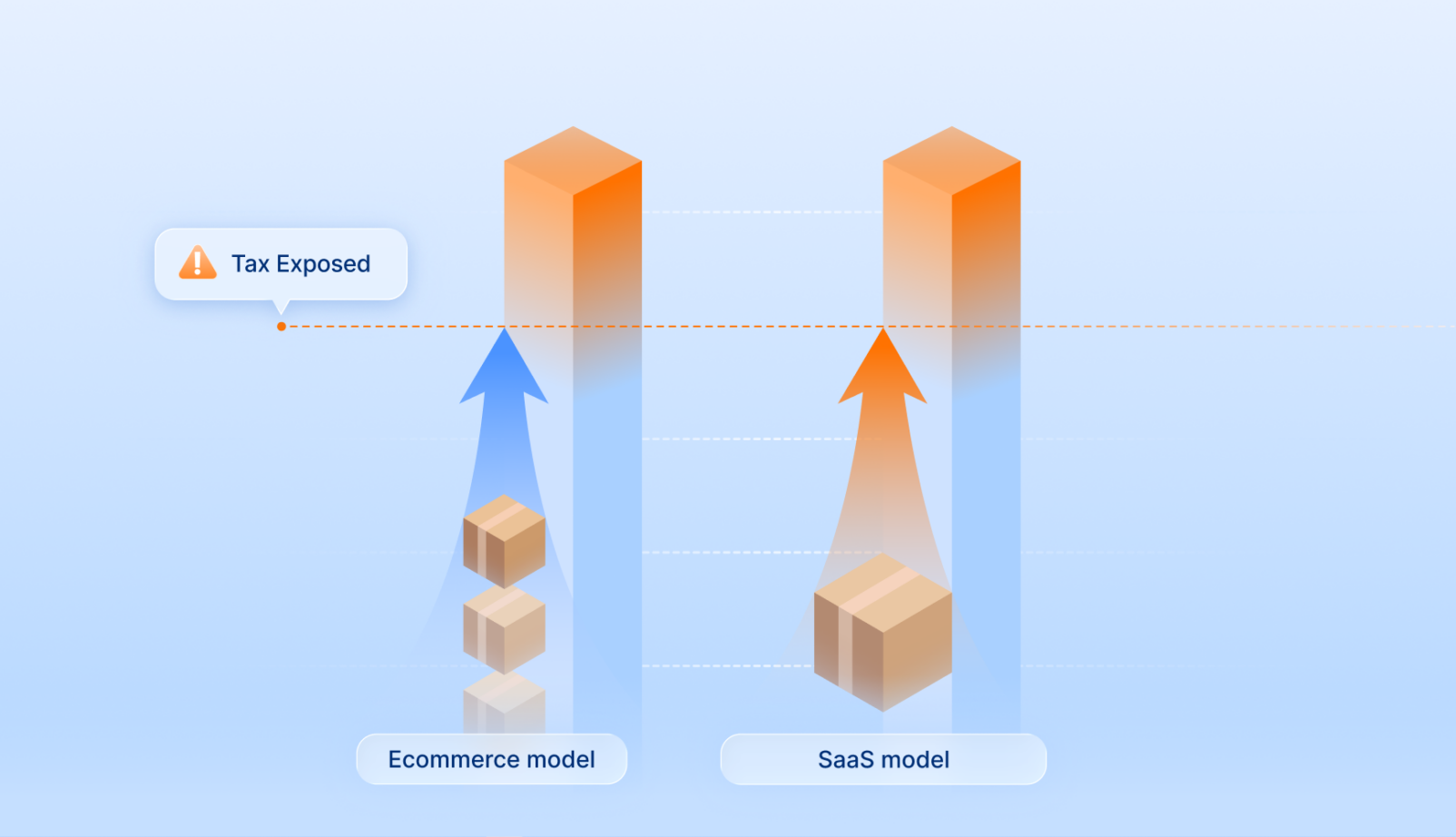
With ecommerce, nexus thresholds may be crossed over several months of transactions. Tax requirements are easier to track and to spot as units — both digital and physical — are sold. As the transaction limit approaches, teams can register and prepare to undertake filing obligations.
With SaaS, a single transaction can put the business over the revenue threshold. Enterprise contracts are a common example, as are annual prepayments. Signing a single customer in a new state can dramatically change revenue totals and trigger filing obligations instantaneously.
Similarly, annual prepayments can send the company over the threshold in a single sale, even if that revenue is only recognized monthly [2] as the service is rendered. In those scenarios, the company will need to file and remit taxes based on the state’s schedule and may need to file multiple times as revenue is acknowledged internally throughout the year.
These problems only scale as SaaS companies expand nationally. New customers in new regions can quickly push the business over the nexus threshold, prompting registration and filing. It can happen quickly, and teams should be prepared for it. Stripe can continue collecting tax normally, but companies must identify those new filing obligations and make sure returns are submitted in the appropriate jurisdictions.
Using Tax Complete, Stripe’s partners can help with those filing needs if Stripe is the only payment processor. If not, the business will need to set up a separate relationship with a filing partner in order to get a cumulative view of their tax obligations prior to filing.
Product taxability isn’t uniform
As growing businesses expand, the rules around how products are taxed can shift in unusual ways.
Bundling multiple products together can change how states classify a product offering, and this can vary greatly between jurisdictions. For example, if the company sells a product subscription, plus training and a support package, is that a software product, a digital good, an information service, or something else?
Particularly for SaaS brands, sourcing rules are another major factor. Depending on the state, tax may be calculated based on the origin of the buyer or the location of the seller. For physical products, this system is straightforward. However, SaaS services can be accessed from multiple locations, which adds compilations about how subscriptions and plans are taxed and which state should receive that money.
Because states don’t always agree on how to approach these issues, taxability rules shift and things get messy.
Platforms like Stripe Tax or TaxCloud can help to determine tax treatment by using product tax codes unique to a specific jurisdiction, which makes reporting significantly easier when it’s time to file.
Stripe Tax only sees Stripe revenue
Many tax automation platforms — including Stripe — only have visibility into the transactions they receive. For teams operating entirely inside Stripe, this isn’t a problem because all sales are running through the same system.
However, it’s common for a business to begin processing sales outside of Stripe as it grows. That becomes problematic, because those transactions still count toward the economic nexus threshold, but they aren’t tracked by Stripe and Stripe Tax doesn’t calculate the tax.
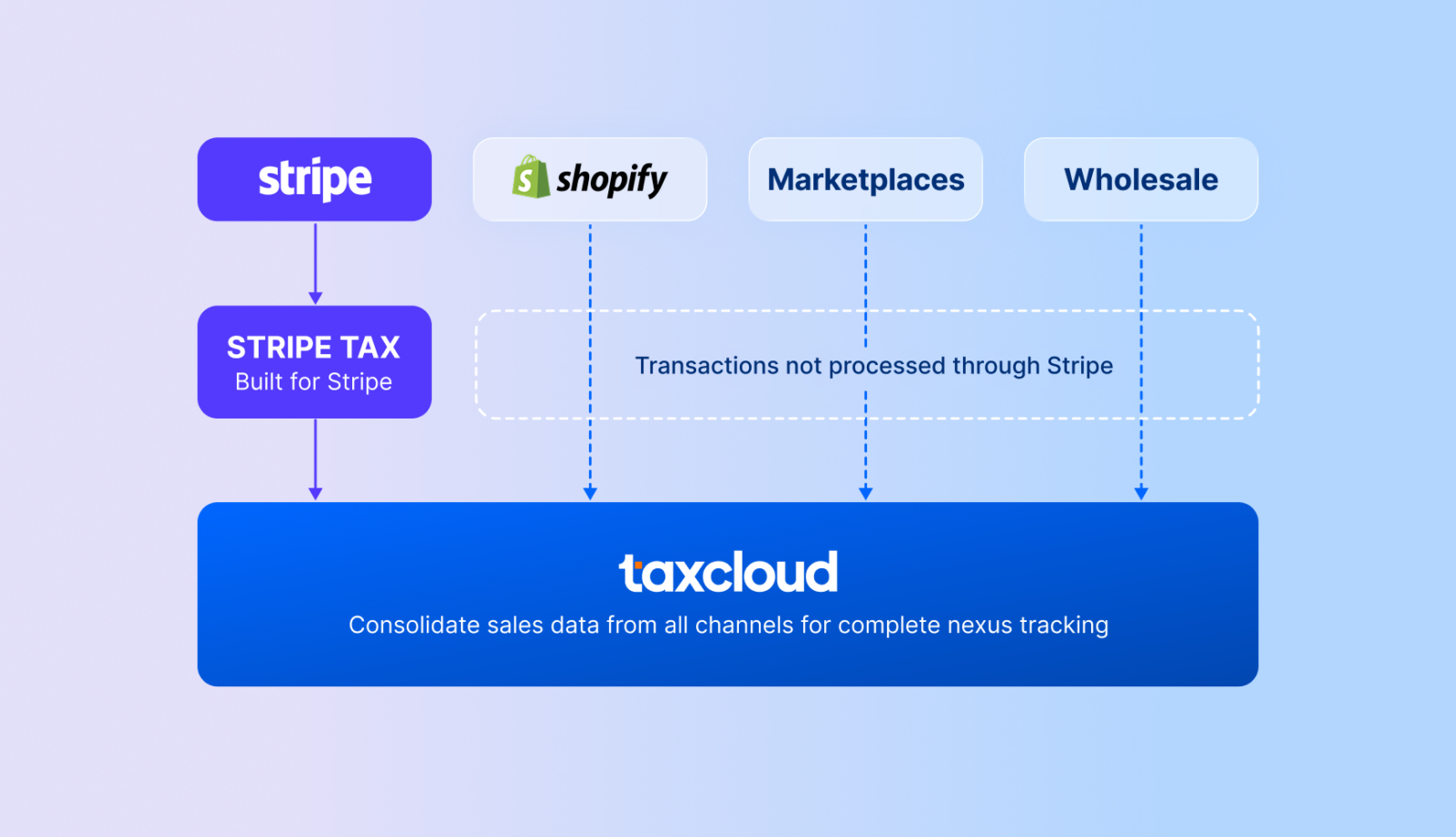
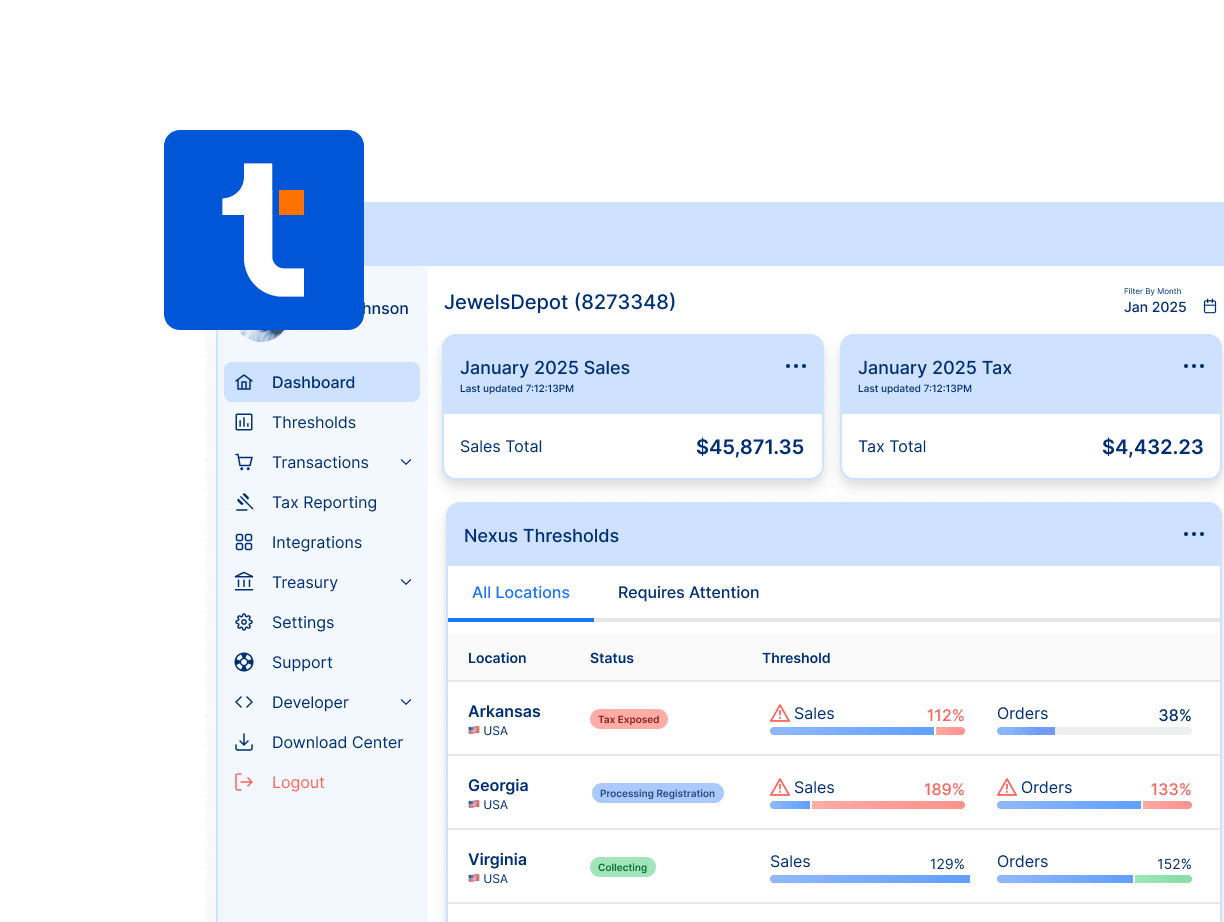
To offset these issues, transactions executed through Stripe must be consolidated with those processed outside of Stripe. It’s possible to do this manually, with the help of a CPA, or by using a tax partner like TaxCloud that can pull in transaction details from a number of sources, including Stripe, and track them cumulatively via a dedicated nexus tracking tool.
Registration timing matters
Businesses generally need to register in jurisdictions where they’ve created an obligation before beginning collection. For companies who know they’ll exceed the tax threshold, it makes sense to register early and start the collection process.
The problem comes for smaller businesses who are approaching nexus but may not be sure if their annual sales will exceed the threshold. Because obligations may be identified after thresholds have been crossed, businesses may need to deal with historical filings, accrued penalties, and other remediation required to stay compliant.
Stripe offers a limited number of registrations [3] as part of its plans, with overages totalling out to $150 per registration. Ultimately, it’s up to the business to figure out when and where it needs to register.
How to file sales tax returns as a Stripe merchant
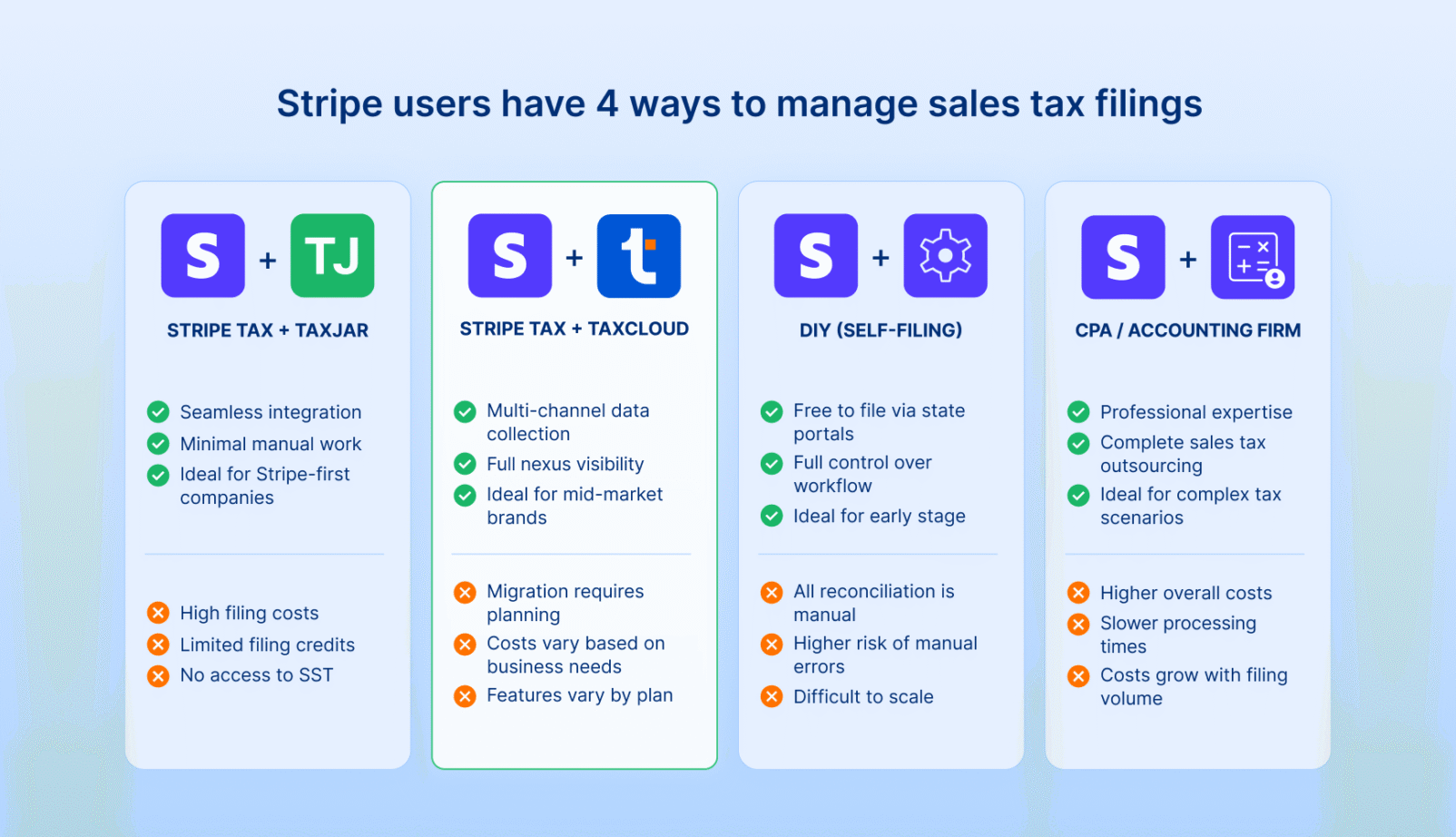
Broadly speaking, Stripe users have four ways to manage sales tax filings. The right solution will depend on where a business sells, how quickly it’s growing, and whether or not all transactions are captured by Stripe.
Smaller companies may be able to get by with a DIY approach, handling everything without automation. Most companies will need to find a way to either automate or offload tax compliance before those obligations begin to overtake other business duties.
Below are the most common filing approaches for Stripe merchants.
1. Use Stripe Tax + TaxJar
Companies wanting to stay as connected as possible to the Stripe ecosystem can subscribe to the Tax Complete plan and use Stripe Tax’s pre-integrated filing partners: TaxJar [4] and Taxually.
Both solutions are already connected with Stripe, and customers can use the filing credits associated with the plan to cover a portion of the costs. In this scenario, Stripe Tax handles tax calculations while TaxJar/Taxually supports filing and remittance in the appropriate region.
✅ Pros:
- Native filing path within the Stripe ecosystem
- Requires minimal operational changes
- Calculations and filing are closely connected
- Data handoffs are seamless due to pre-integration
- Reduces manual return processes
- Ideal for Stripe-first companies
❌ Cons:
- Filing costs increase as obligations grow
- Limited number of filing credits per plan
- No access to SST saving
- No visibility into revenue processed outside of Stripe
If the business is operating primarily through Stripe and filing in a limited number of states, this is the most efficient way to file without building a separate workflow or introducing major process changes.
Depending on the marketplaces used, staying aligned with Stripe’s pre-built process will be more viable for some companies than others. Eventually, however, it’s likely that companies will need compliance capabilities outside of the native workflow.
2. Use third-party solutions
Businesses that want to leverage Stripe Tax can continue using the platform for calculations while choosing to work with a separate filing partner. To do this, users will need to manually export their tax calculations from Stripe Tax or work with a filing solution like TaxCloud, which offers a Stripe integration for easy data collection.
Moving to a third-party partner requires teams to find a compliance solution that aligns with their goals and to effectively build their own tax pipeline. It’s more difficult and complex but offers more options for customization and savings, as well as support for sales channels outside of Stripe.
✅ Pros:
- Keeps Stripe calculation workflow intact
- Supports sales channels outside of Stripe
- Old Stripe transactions and transactions from other channels can be uploaded To TaxCloud to keep the tax history in one place
- Provides broader nexus visibility
- May include additional support and cost-saving services
- Customers can choose their filing partner and associated costs
❌ Cons:
- Requires additional research and setup
- Onboarding may require migration and planning
- Business models and costs vary greatly
- Features fluctuate by partner and plan
One important factor to consider when using third-party solutions is that Stripe effectively becomes one of multiple sales channels, while the filing partner becomes the nexus for all transactions.
For example, users who partner with TaxCloud can continue processing transactions through Stripe and Stripe Tax. However, TaxCloud can also collect sales information from other platforms. Because Stripe can only show transactions that it processed, teams will need to hop into TaxCloud to get a complete view of their tax obligations.
In the event that a storefront offers multiple integration options, teams will also need to determine which service should handle transaction information. Because many filing services also have their own calculation engine, users will need to determine which engine should process a transaction if both can connect to the same platform. This decision will determine the flow of the transaction, how it counts against any usage limits, and which service ultimately holds those transaction details.
3. DIY
Small, early-stage brands can choose to manage filings internally when their tax footprint is small. When only filing for one or two states or only a quarterly basis, filing obligations are much easier to handle.
Under this model, Stripe Tax handles collections. When it’s time to file, employees or consultants export that data and use it to prepare returns, reconcile data, and then file and remit directly via each state portal.
✅ Pros:
- Filing directly via a state portal incurs no cost
- Full control over filing workflows
- Ideal when filing obligations are small
- No additional vendors required
❌ Cons:
- All reporting and reconciliation is done manually
- Requires dedicated time commitment from the company
- Increased risk of missed filings, errors, and penalties
- Difficult to scale as the company grows
Even though DIY solutions can work in the very early stages, this route creates operational commitments that can pull team members away from other responsibilities within the company. While that won’t matter if the company has a dedicated individual who can handle taxes, it becomes a major drawback in small teams, where every individual is responsible for multiple, critical business processes.
As the business grows, the process required to file will eventually force teams to seek filing automation solutions or increase headcount in order to meet demand.
4. CPA or accounting firm
Companies who prefer to avoid automation may outsource their filings to a CPA or an accounting firm.
Doing so moves compliance responsibilities outside of the organization and onto the shoulders of dedicated professionals who understand tax requirements and filing schedules. The company hands over their tax information at a specific time or grants backend access to the CPA, and the CPA does everything else.
✅ Pros:
- Business receives help from a professional
- Tax obligations are offloaded from the business
- Complex tax scenarios are handled by experts
- May be covered under broader accounting support contracts
❌ Cons:
- Costs increase with filing volume and hourly requirements
- Transaction data must be shared
- Less automation equates to slower filing processes
- Response times may vary during critical filing periods
- Multi-channel reporting can become complicated
If a company already has accounting support in place, handing tax duties to a CPA or firm can make sense. The downsides are the compounding costs and slower processing times when handing over that documentation.
In most cases, automated solutions are more cost effective than relying on a CPA, and many CPAs also use automated compliance platforms to expedite their own processes. While accounting expertise is great for tricky solutions, they may not be necessary for standard filing practices.
Choosing the right filing solution
There isn’t a one-size-fits-all filing partner that works for every business.
Instead, the right solution will depend on a variety of factors. Where the revenue comes from, the level of growth, the ability to manage compliance internally, and other details will matter when making that determination.
Many teams can keep everything in Stripe without issue. Others eventually reach a point where filing schedules and reporting requirements are too difficult to maintain without additional support.
In this section, we’ll cover basic questions and considerations that teams can use to find the right sales tax compliance partner.
Questions to ask
Different filing workflows can be worth exploring as a business grows.
Something like a DIY solution might work well in the early stages before taxes become such a timesink that teams are forced to offload or automate. Doing so doesn’t require the business to abandon Stripe, but it’s important to determine how a new filing partner might work with existing payment systems and tax collection tools.
Here are a few questions to ask when searching for a good filing solution:
- Will this solution impact our Stripe workflows?
- How does this solution integrate with Stripe?
- What other data sources does the platform support?
- How is pricing calculated?
- What obligations stay in-house?
- How are registrations and remittance handled?
- Are auxiliary services (nexus tracking, VDAs, etc.) included?
One important consideration: The lowest-cost solution isn’t always cheaper, as costs may be hidden in other areas of the business.
For example, if internal teams still need to monitor nexus thresholds, prepare data, manage registrations, and handle government correspondence, the total cost of compliance may be greater than simply paying a little more for an automated service with those capabilities. A strong filing partner should reduce the internal workload over time and enable core team members to engage with other essential duties.
At the same time, it’s possible to purchase a tax solution that’s overengineered for the compliance obligations that the company is currently facing. When assessing solutions, be sure to look for partners that have enough features to handle all relevant compliance duties and that can scale to meet upcoming needs.
Tools and services your filing partner should have
While Stripe Tax handles payment processing and tax calculations, the filing partner that the team chooses will need to do more than submit paperwork.
The strongest solutions ease the process by improving visibility into where obligations exist and helping to automate recurring actions must be taken.
For Stripe users, capabilities worth prioritizing include each of the following:
- Stripe integration
- Economic nexus tracking
- Multi-channel transaction visibility
- Automated filing and remittance
- SST participation (where available)
- Exemption certificate management
- Audit and/or notice support
- Registration support (covered by Stripe Tax)
- Expert support (ideally based in the U.S.)
The exact mix of features will vary based on the business but, in every case, the filing partner should complement the services already provided by the Stripe ecosystem.
In many cases, teams may not need every feature. With TaxCloud, customers funneling all sales through Stripe won’t need TaxCloud’s own calculation engine. However, the engine is included by default on every plan and can be helpful if transactions need to be processed outside of Stripe.
Similarly, a Stripe integration isn’t completely necessary, as Stripe’s transactions can be exported, but it’s helpful in order to automatically import transactions and keep numbers up to date in real time.
When to upgrade your filing process
Especially for smaller companies, Stripe’s native filing options can be a perfectly reasonable place to start. If all revenue flows through Stripe and filing duties are relatively simple and infrequent, going all-in with the Tax Complete plan can make the entire process simple and easy to manage.
However, this strategy has an upper limit where growing companies will see greater benefits by switching to a dedicated provider. Typically, this happens when a business wants to sell outside of a Stripe-connected marketplace or when the number of filing credits that Tax Complete provides simply doesn’t keep up with company needs.
Here are a few signs that it’s probably time to look for a dedicated filing partner:
- Company filing requirements exceed the number of credits allotted by Tax Complete. The $1,500 per month Tax Complete plan only offers 32 filings per year. If the business needs to file monthly in more than two states, teams will need to pay for additional filing services at $55 per filing.
- Revenue is coming from outside Stripe. Sales through marketplaces, invoices, wholesale channels, or additional platforms still contribute to filing obligations, but Stripe can’t see those transactions. In this scenario, companies will need to find a way to get a full view of their sales in order to properly determine tax compliance.
- Manual workloads are overwhelming the team. The Tax Basic plan provides no filing solution, and companies taking a DIY approach may quickly find themselves struggling to manage filings duties. In this scenario, adding a filing partner is a smart move.
- Tax services cost too much. CPAs, accountants, and even some filing services can drive up filing costs. Others, like TaxCloud, offer discounted filing services when filing plans are purchased in bulk and actively enroll eligible businesses in the SST program to completely eliminate filing costs in up to 24 states.
- The business requires auxiliary tax services. If the company needs support for auxiliary issues like audit preparation, notice management, SST enrollment, or multi-channel support, finding a solution that combines well with Stripe Tax can grant access to features that Stripe doesn’t offer.
In many cases, choosing a filing partner isn’t about replacing Stripe or its ability to process transactions. Using integrations, the company’s relationship with Stripe can remain in place while a new filing partner fills in the gaps that Stripe Tax was never designed to handle.
Best solution: Stripe Tax + TaxCloud
Stripe is a powerful ecosystem with tremendous reach and versatility. By leveraging the platform, companies can process transactions on a global scale while using partnered filing services to stay compliant with local authorities around the globe.
However, by default, Stripe Tax doesn’t handle filing and remittance and outsources to a third-party filing partner, even for members on the Tax Complete plan. The system simply wasn’t designed to support that aspect of tax compliance.
To get the most mileage out of Stripe Tax, the best solution is to pair it with a dedicated filing platform like TaxCloud.
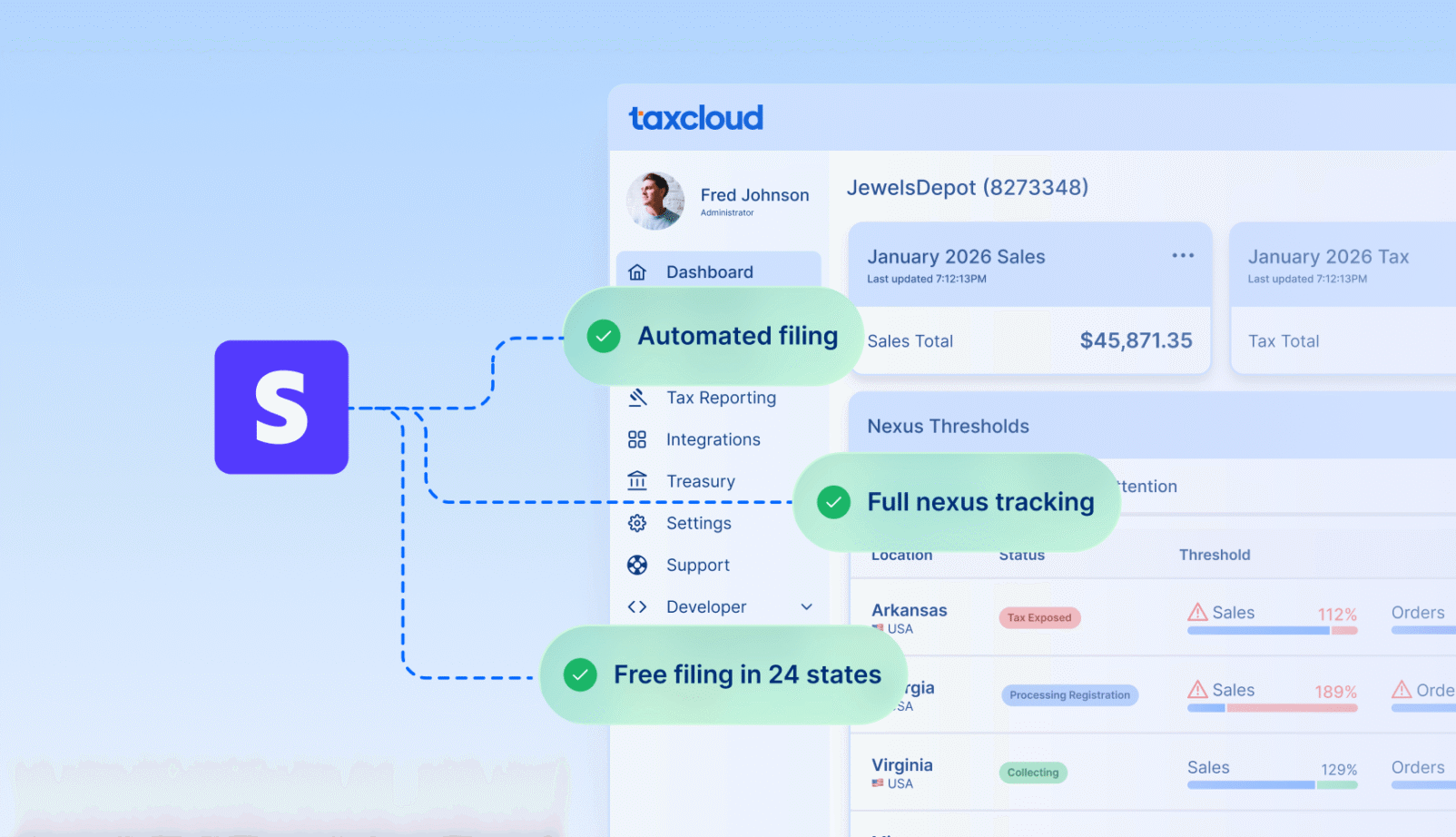
TaxCloud allows companies continue using Stripe while also adding filing automation, multi-channel sales support, SST savings opportunities, and broader compliance services to their toolkit. Plus, TaxCloud includes knowledgeable, US-based support from real people who can help you get up and running quickly.
With TaxCloud’s Stripe integration, transaction data automatically flows into TaxCloud in real time and combines it with sales processed through other merchant services, like Shopify. In doing so, teams can get a 360-degree view of their tax obligations and more accurately monitor nexus thresholds.
When it’s time to file, TaxCloud uses all imported tax data to automatically create tax documentation, file it, and remit relevant fees to the appropriate state authorities. Companies enrolled in the SST program can also have TaxCloud file taxes for free on their behalf, creating an opportunity for major savings.
Want to give TaxCloud a try?
Sign up for a free 30-day trial with TaxCloud or speak directly to one of our product experts to learn how TaxCloud can support your business.
Stripe sales tax filing — FAQs
Not directly.
Stripe Tax calculates and collects sales tax automatically during transactions and supports automated filing via third party partners. The partner used depends on where filing takes place. In the U.S., TaxJar (another Stripe-owned company) handles filing, while Taxually manages international filing submissions.
These third-party partners are pre-integrated with the Tax Complete plan, meaning that teams who choose to file using the credits associated with their plan will automatically engage with either of these pre-selected companies. However, this is an outsourced solution, and Stripe is not filing directly on behalf of the company.
Yes. Collecting sales tax doesn’t eliminate the obligation to file returns.
In most jurisdictions, businesses still need to submit sales tax returns on the schedule assigned by the state once nexus thresholds have been met, even during periods of little or no activity.
One common exception involves marketplace facilitator laws, where a marketplace is required to collect and remit sales tax on behalf of sellers. However, those rules apply to the marketplace itself and won’t eliminate filing obligations for revenue generated elsewhere.
For companies using Stripe directly, collecting tax doesn’t remove the responsibility to determine where returns need to be filed.
Yes.
It’s common practice for companies to use Stripe Tax for payment processing and tax calculation while using a separate provider for filing and compliance support.
Using this method allows a business to preserve their existing billing workflow while adding a variety of filing- and compliance-related capabilities to their tax toolkit. It’s also possible to further combine these services with expertise from a CPA or accounting firm, who can likely use the filing tools to assist with filings or complications from state audits.
This depends on how the business operates. Companies with relatively simple filing requirements who send all revenue through Stripe can leverage Stripe Tax to cover a significant portion of their workflow.
As a business expands to additional states or introduces new revenue channels, broader compliance support is often required. When that happens, additional workflows may be necessary in order to meet the requirements set forth by local jurisdictions.
Broadly speaking, growing SaaS companies would be best served by continuing to use Stripe as a payment system and tax collection solution and switching filing duties to a dedicated partner platform such as TaxCloud.
Sources:
- 1.
- 2.
- 3.
- 4.