TaxJar WooCommerce: pricing, limits, and a better alternative



TaxJar WooCommerce plugin: What merchants need to know before choosing TaxJar
TaxJar was acquired by Stripe in 2021. What followed was predictable: support was outsourced, product development slowed, and TaxJar was quietly repositioned as Stripe Tax’s U.S. filing partner rather than a standalone product.
For WooCommerce merchants, the effects show up in three places: rising costs, slower support, and an SST gap that costs eligible businesses thousands of dollars a year in unnecessary fees.
This guide breaks down how TaxJar works with WooCommerce, where it falls short at scale, and why a growing number of merchants are making the switch.
Why do you need a WooCommerce sales tax extension in the first place?
WooCommerce powers millions of online stores, but sales tax compliance isn’t one of its strengths. The built-in WooCommerce sales tax plugin options are manual, static, and don’t scale.
Here’s what WooCommerce can’t do on its own:
- Automatically calculate and remit sales tax. You can manually configure rates, but WooCommerce won’t update them as tax laws change or as your nexus footprint expands.
- Track economic nexus thresholds. If your store crosses a sales threshold in a new state, WooCommerce won’t tell you. That’s how merchants end up with unregistered nexus and unexpected back-tax exposure.
- Automate filing. Even WooCommerce Tax (the platform’s own plugin) doesn’t handle filing or nexus monitoring.
That’s the gap a third-party sales tax plugin fills: real-time rate calculation, nexus tracking, and automated filing across every state where you have an obligation.
How does TaxJar work with a WooCommerce store?
TaxJar’s WooCommerce plugin integrates with your WooCommerce store to handle the core compliance workflow: real-time rate calculation at checkout, nexus tracking, and automated filing via AutoFile. It covers the basics that WooCommerce can’t handle natively. And for straightforward setups, it works.
A few things worth knowing before you commit:
- Real-time calculation requires the Professional plan. Starter plan users don’t get TaxJar API access, which means no real-time rates at checkout. You’re working from imported transaction data after the fact.
- AutoFile isn’t included. It’s a per-return add-on — $50/return on Starter, $55/return on Professional. 2 free credits per year on Starter, 4 on Professional.
- WooCommerce is a third-party integration. TaxJar’s WooCommerce connector isn’t maintained by TaxJar’s team. To connect, you’ll need to install the plugin and authenticate via your TaxJar account. When integration issues arise, resolution depends on external developers.
The feature set is comparable to other sales tax platforms. Where TaxJar diverges is pricing at scale, SST access, and support quality since the Stripe acquisition. For accurate sales tax rates across all U.S. jurisdictions, the TaxJar API is required. And that means Professional subscription pricing.
TaxJar reviews: What WooCommerce merchants report
The overall review landscape tells a consistent story — since the Stripe acquisition, complaints have increasingly concentrated across several key areas, including pricing, customer support, and product reliability. This trend is also reflected in the WooCommerce marketplace, where the TaxJar WooCommerce app currently holds a 1.0 out of 5 rating. [1]

Across these reviews, the most common limitations tend to fall into a few recurring categories, highlighting ongoing challenges users are experiencing with the platform.
| TaxJar limitations | What users are saying |
|---|---|
| Pricing and overcharges | Starter begins at $39/month for 200 orders. API calls count as orders (10 calls = 1 order), which catches merchants off guard. Users on Reddit report being billed for volume they didn’t generate. AutoFile costs $50–55/return on top of the monthly fee. |
| Real-time calculation locked behind Professional | Starter plan users don’t get API access. Tax rates at checkout are based on imported data, not live calculation — a meaningful accuracy risk for active stores. |
| Support quality | Offshore support with 24+ hour response times. Phone access requires the $349/month plan. TaxJar’s Shopify App Store rating has dropped to 2.9 stars — all 2023+ reviews are 1–2 stars. Representative review: “Support is in India, each response is 24 hours or more.” (from: Shopify App Store) |
| Integration reliability | WooCommerce connector is third-party maintained. Merchants report duplicate entries, syncing delays, and limited ability to correct transactions without exporting offline. |
| Exemption certificate management | Not available on Starter. Businesses managing exempt customers need Professional or a manual workaround. |
| Limited auto-filing | While TaxJar includes 2 free state sales tax filings with the Starter plan and 4 for the Professional plan, each additional return costs $50 for Starter and $55 for Professional. |
Have you outgrown TaxJar? When to switch, when to stay.
TaxJar works for what it was originally built for: small stores filing in a handful of states, with straightforward product catalogs and low support needs. If that’s you, it may be enough.
It starts to break down when:
- You’re filing in five or more states and AutoFile costs are compounding
- You’ve hit TaxJar’s support wall — slow responses, offshore tickets, no phone access
- You’re eligible for SST savings but paying $50–55/return across every state
- Your WooCommerce integration is generating sync errors with no clear resolution path
TaxJar is where a lot of merchants start. It’s rarely where growing merchants stay.
What to look for in a WooCommerce sales tax plugin
If you think you’re starting to outgrow TaxJar, here’s what to prioritize in a TaxJar alternative replacement.
- Transparent pricing: Hidden fees compound fast. Look for straightforward, usage-based pricing that doesn’t surprise you at scale.
- Real-time calculation and auto-filing: Static rates and manual filing create compliance gaps. You need a solution that calculates accurately at checkout, handles sales tax reporting, and files automatically.
- Audit support: Multi-state sellers are audit targets. Look for a platform that offers audit-ready reporting and direct support when a notice arrives.
- First-party WooCommerce integration: Third-party connectors create support gaps. A native integration maintained by the vendor means faster resolution when something breaks.
- SST program access: A Certified Service Provider under the Streamlined Sales Tax program can eliminate registration fees and sales tax returns filing costs in 24 member states.
- U.S.-based support: Filing deadlines don’t wait for offshore ticket queues. Look for a team available by phone and email, with response times measured in hours, not days.
TaxCloud was one of the only companies with a direct WooCommerce integration — and it just worked. When you need help, you get a real person who knows your account and the intricacies of sales tax.
TaxCloud WooCommerce Integration: built for sellers who’ve outgrown TaxJar
TaxCloud and TaxJar offer the same core features: real-time sales tax calculation, nexus tracking, filing automation, and reporting. The difference isn’t the feature list — it’s what you pay, what you save through SST, and what happens when you need expert support.
TaxCloud delivers accurate sales tax calculations across 13,000+ U.S. jurisdictions in real time, for every WooCommerce product in your catalog, including exempt items. It also supports multi-store setups across WooCommerce, Shopify, and BigCommerce from a single account, with no additional per-store fees or separate logins.
Here’s how the two platforms compare side by side.
| Feature | TaxJar Starter | TaxJar Professional | TaxCloud Starter | TaxCloud Premium |
|---|---|---|---|---|
| Subscription cost | $39/mo / $419/yr | $99/mo / $1,069/yr | $19/mo / $199/yr | $79/mo / $799/yr |
| Orders included | 200/mo / 2,400/yr | 200/mo / 2,400/yr | 100/mo / 1,200/yr | 200/mo / 2,400/yr |
| WooCommerce integration | Data import only | Data import + API | Data import only | Real-time integration, unlimited |
| Sales tax calculation | Imported data, no API | Real-time via API | Imported data, no API | Real-time via API |
| Nexus monitoring | Self-serve checker | Automated dashboard + alerts | Nexus reporting + monitoring | Nexus reporting + monitoring |
| Auto-filing | 2 free credits/yr, $50/additional | 4 free credits/yr, $55/additional | $39/return, volume discounts to $20/return, free filing in 24 SST states | $39/return, volume discounts to $20/return, free filing in 24 SST states |
| Exemption certificates | ❌ | ✅ | ✅ | ✅ |
| Reporting | Jurisdiction-level | Jurisdiction-level + advanced | Jurisdiction-level + return-ready | Jurisdiction-level + return-ready |
| API access | ❌ | ✅ | ❌ | ✅ |
| Support | Email only | Email, phone at 1,000+ orders/mo | Email, help center | Email, phone, help center |
| Free filing in 24 SST states | ❌ | ❌ | ✅ | ✅ |
| Audit support | ❌ | ❌ | ✅ | ✅ |
| Team access | Single user | Up to 10 users | Unlimited | Unlimited |
Note: TaxCloud WooCommerce plugin is coming to TaxCloud’s Starter plan in 2026. Full WooCommerce integration currently only available on Premium.
Why WooCommerce merchants choose TaxCloud
TaxJar works until it doesn’t. And for WooCommerce merchants filing in multiple states, the cracks tend to show in the same three places: filing costs that compound through AutoFile fees, support that doesn’t respond fast enough when it matters, and SST savings left on the table entirely.
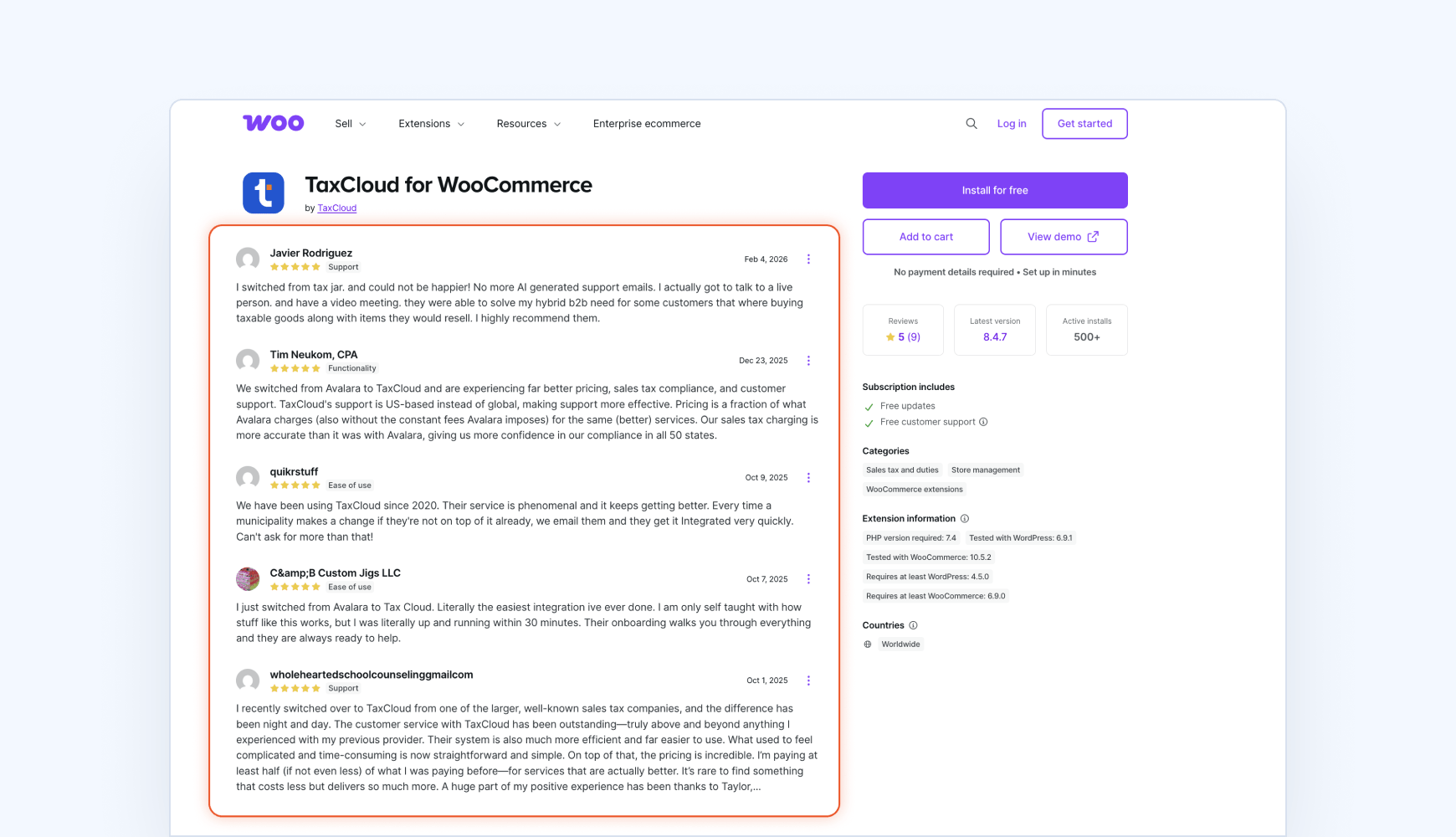
TaxCloud’s WooCommerce integration is first-party, actively maintained, and built for sellers who need compliance to run quietly in the background — not become a recurring operational problem.
It would have cost us around $40,000 a year to go with a company that wasn’t an SST program participant.
After switching to TaxCloud, Cable Bullet reduced their total sales tax compliance spend by 40–50%.
For a full breakdown of how TaxJar’s pricing scales — and where the costs compound — see our detailed TaxJar pricing guide.
Find out what you'd save with TaxCloud
Stop overpaying for offshore support and missed SST savings. Talk to our team about your WooCommerce store and sales tax compliance setup and we’ll show you exactly what you’d save.

TaxJar WooCommerce — FAQs
Yes. TaxJar integrates with WooCommerce to handle sales tax calculation, nexus tracking, and filing. However, real-time calculation via the TaxJar API requires the Professional plan — Starter plan users work from imported transaction data, not live rates at checkout.
TaxJar’s Starter plan begins at $39/month for 200 orders. AutoFile is a per-return add-on — $50/return on Starter, $55/return on Professional. API calls count as orders (10 calls = 1 order), which can inflate costs for stores using the TaxJar API heavily.
No. TaxJar does not participate in SST, meaning you pay $50–55/return across all states. TaxCloud is a Certified Service Provider under the SST program, which reduces filing costs to $39/return — with volume discounts dropping to $20/return — and includes free filing in 24 SST member states.
The right WooCommerce sales tax plugin depends on your filing volume, states, and support needs. For small stores filing in one or two states, TaxJar covers the basics. For merchants filing in five or more states who need SST savings, audit support, and U.S.-based support, TaxCloud is the stronger long-term fit.
Sources:
- 1.