Introducing TaxCloud's new Transactions page: find all your data in one place
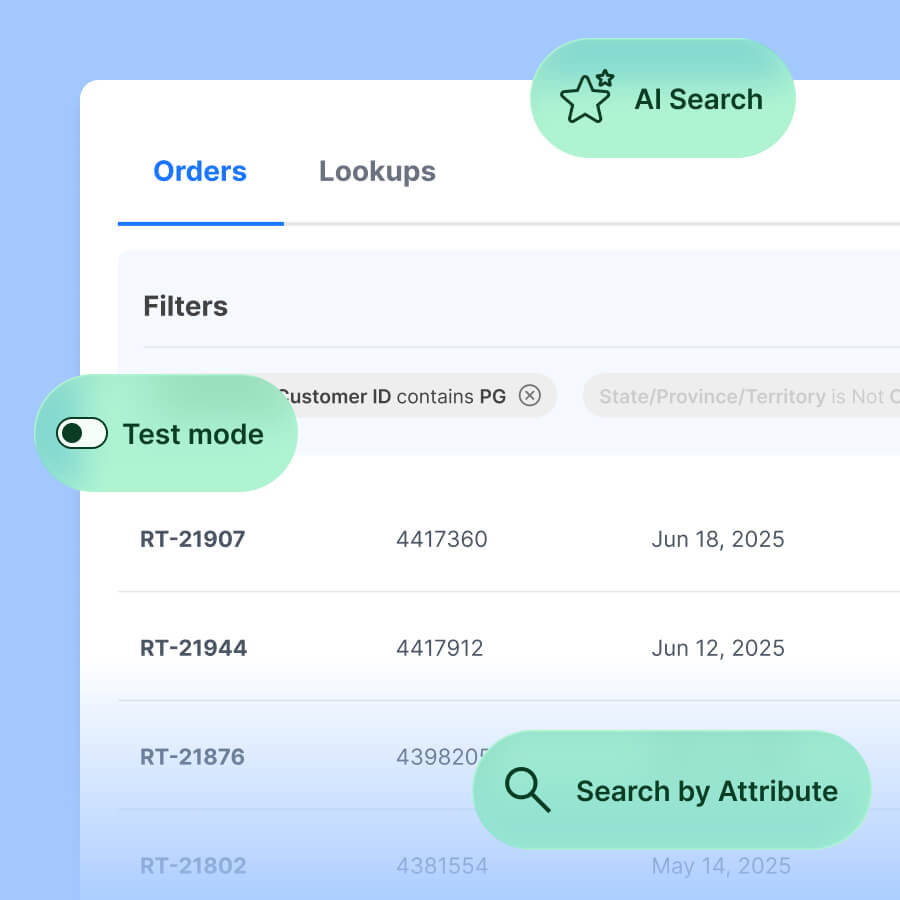
The new Transactions page inside TaxCloud brings your orders, lookups, and test transactions into one view, with up to 2 years of history you can search at once.


The new Transactions page makes it faster to find the transaction data you need: search orders, lookups, and test transactions together, describe what you need in plain language with AI search, or stack filters to build a precise view.
Whether you’re answering a customer question, checking that a connection is syncing, or reviewing a quarter of transactions, you can get to exactly what you’re looking for.
What’s new
- Orders and lookups in one place. Lookups now live on the Transactions page, with the same search and filters as orders. A lookup is TaxCloud’s real-time calculation call, the one that runs while someone is browsing or at checkout, rather than a record of a completed sale.
- Search the way you’d ask a question. Describe what you need, like “Show me all returned orders in Q2 2025 in Texas,” and AI search applies the matching filters for you.
- Access up to 2 years of history. Search 2 years of transactions at once, and view data across quarters without piecing date ranges together.
- Search by Attribute. Stack filters for date, status, state, connection, customer, amount, and more to narrow results, build a precise view, and find exactly what you need.
- Get every transaction type in one view. Orders, standalone returns, Canadian transactions, marketplace and historical transactions, and test transactions all live here. Use Order Kind to separate orders from credits (standalone returns), or Exclude from Filing to isolate marketplace and historical transactions.
Why this matters
Transactions and lookups used to live on separate pages, and each search covered a single month. Pulling one customer’s history or a quarter of transactions meant switching months, toggling checkboxes, and running the same search again and again.
The new Transactions page is built for the teams who dig into transaction data every day: support answering customer questions, finance reconciling month-end, and ops checking that integrations are sending data correctly. With everything in one view, you can find what you need in one search instead of several.
How to get the most out of the new Transactions page
A few ways to put the new search and filters to work:
- Confirm a connection is syncing. Filter by Connection to see what has come through from a specific integration.
- Pull a customer’s history. Filter by Customer ID to see their orders from the last 2 years.
- Review orders for a period. Ask AI search for “orders in Q2 in Texas” and it sets the filters for you.
- Search a specific lookup. Switch from Orders to Lookups at the top of the page, then search by ID.
- Download what you need. Apply at least one filter, then download a CSV of the matching transactions.
For jurisdiction reports, use the Tax Reporting page. The Transactions page is built for search and review, so its downloads are lighter than a filing report and do not include jurisdiction tax data. To gather this information, use the Download Center.
What’s happening to the legacy Transactions & Lookups page?
The legacy Transactions & Lookups page is being retired. Everything it did now happens on the new Transactions page.
- Your lookups are moving with you. Existing lookups are being migrated to the new page, and lookup search covers the last 180 days.
- Your filters are still here. Date range, lookup ID, customer ID, amount range, status, and more are all supported.
- Downloads are leaner. The Transactions page CSV covers core order fields and doesn’t include jurisdiction detail. For jurisdiction reports, use the Tax Reporting page. Detailed transaction reports are available in the Download Center.
This release is the foundation for more improvements to how you search and review transactions and lookups in TaxCloud.
Ready to try the new Transactions page?
Log in to your TaxCloud account and open Transactions from the left menu, or book a demo to see how TaxCloud organizes your transaction data.
FAQs
A lookup is a tax calculation. It’s TaxCloud answering “how much tax applies here?” during browsing, a checkout estimate, a quote, or address validation. It doesn’t record a sale or create tax liability, which is what separates it from an order. For more detail, see What’s the difference between a lookup and an order?
Mostly no. The search bar and page layout will feel familiar, and lookups cover the same fields you searched before. Filters work differently than they did on the legacy page, so there’s a short adjustment, but the underlying task is the same.
Up to 2 years for orders and 180 days for lookups.
The Transactions page is built for search and review, so its CSV focuses on core order fields. For jurisdiction reports, use the Tax Reporting page. Detailed transaction reports are available in the Download Center.