TaxCloud's new CSV upload experience: catch errors early, fix them fast


TaxCloud’s improved CSV experience gives you more control and visibility throughout the transaction upload process.
Whether you’re uploading historical orders, importing transactions, adding returns, or making adjustments before filing, the new workflow gives you more confidence that your data will load correctly the first time.
What’s new
- Cleaner upload experience. A new upload flow with the option to adjust errors during upload, reducing your time spent on formatting transactions.
- CSV template & documentation. Clear error messages show exactly what’s wrong, making it easier to get uploads right the first time.
- Real-time validation and automatic adjustments. Formatting and validation issues are flagged early, and common issues are automatically adjusted, reducing the need for rework.
- Clearer visibility. Easily see what succeeded and what failed after an upload, with detailed feedback to help you make corrections without starting over.
Why this matters
Most sales tax platforms treat CSV uploads as a last-resort workaround, forcing you to debug formatting issues through trial and error.
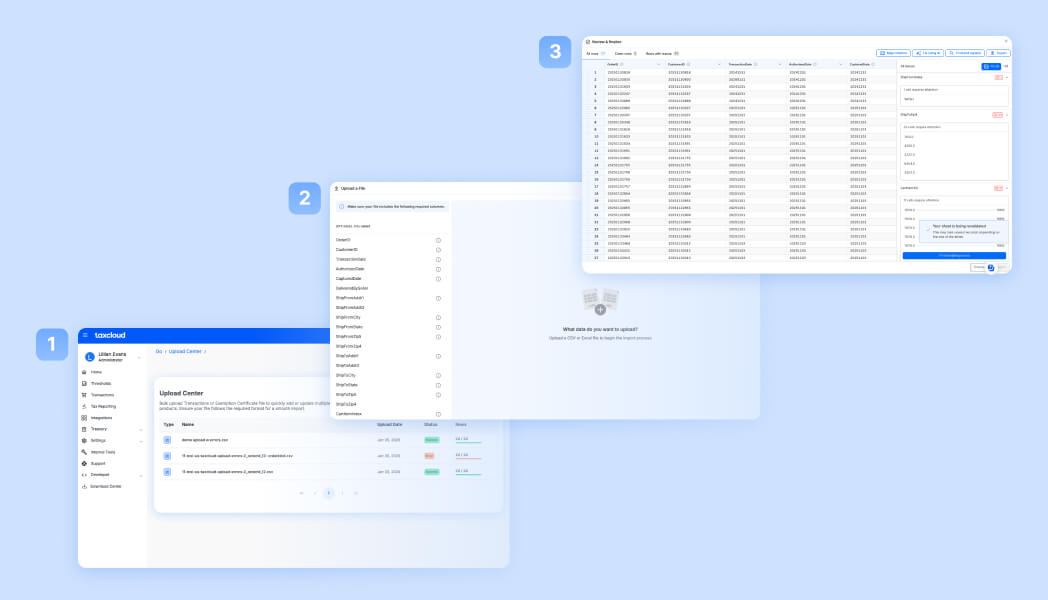
TaxCloud’s CSV experience is built for sellers and teams that rely on CSV uploads. Whether you’re migrating from another provider, reconciling month-end transactions before filing, or managing multiple stores or client accounts, these improvements will help you upload your data with confidence and avoid hours of troubleshooting.
When to use CSV uploads
CSV uploads are designed for workflows where bringing data into TaxCloud via file import makes the most sense:
- Historical data imports during migration, onboarding, or backfilling compliance gaps
- Businesses with custom systems or unsupported platforms that don’t have pre-built integrations
- Month-end adjustments before filing (corrections, refunds, or late-arriving transactions)
- Accountants managing consolidated client data where CSV is the handoff format
CSV uploads give you control over what gets imported and when, especially for workflows where pre-built integrations aren’t available.
Ready to try the new CSV upload experience?
Log in to your TaxCloud account or book a demo and see how TaxCloud handles historical data imports and multi-state compliance.
TaxCloud's new CSV upload — FAQs
No. Existing files and workflows work as before. The new experience adds validation and clearer feedback, making it more reliable and easier to use.
CSV files formatted to TaxCloud’s structure. Download the template from your account.